
The short version
- What launched: on Nov. 18, 2026, OpenAI released ChatGPT for Accounting: its own Accounting plugin plus partner plugins for QuickBooks Online, Xero, Oracle NetSuite, Oracle QuickStart, BILL, FreshBooks, Rillet and Campfire.
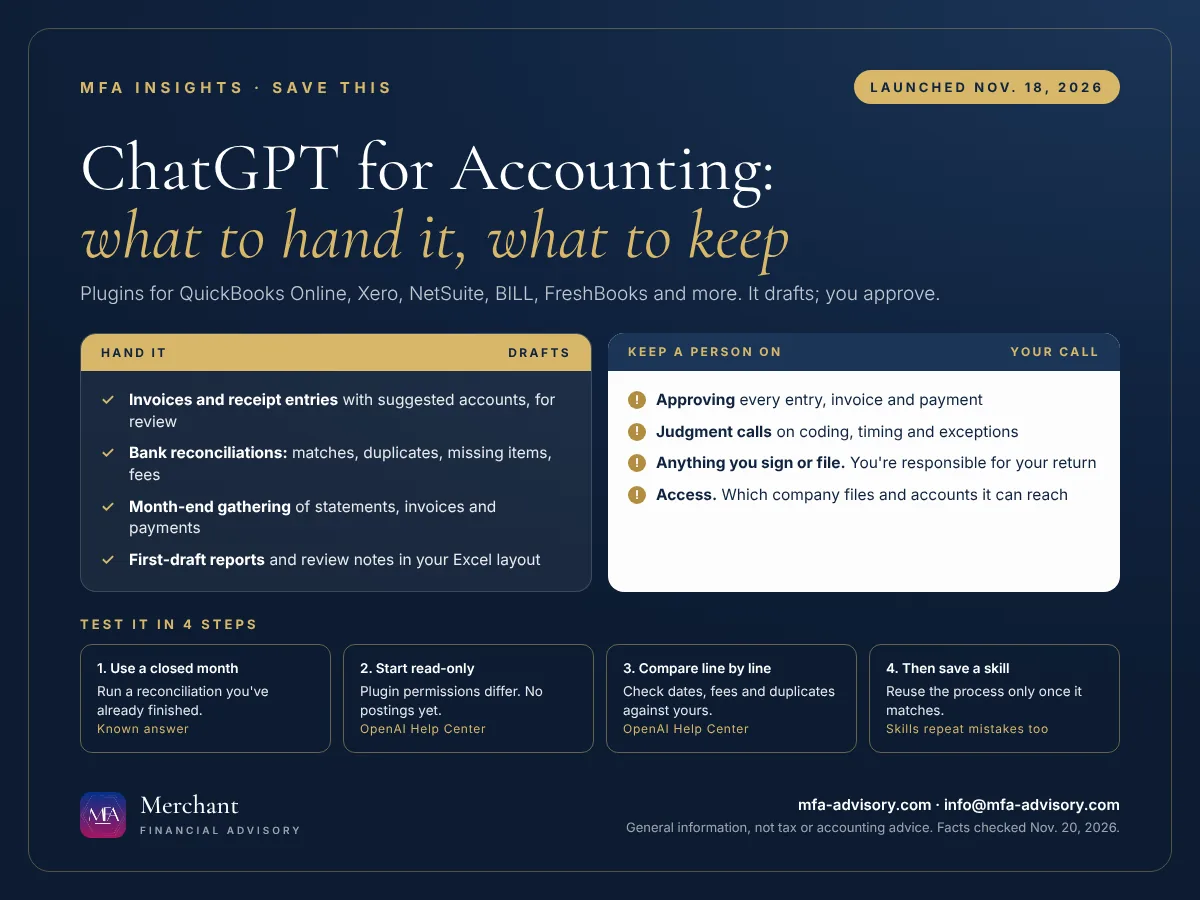
- What it does: drafts invoice and receipt entries with suggested accounts, matches bank statements to your ledger, gathers records for month-end and drafts reports and review notes, all for you to review before anything is approved.
- Who can use it: it runs in the ChatGPT desktop app. ChatGPT Business members can install it themselves; Enterprise workspaces need an admin to approve it.
- What doesn't change: you still approve every entry, and you're still responsible for every number on your tax return.
Bottom line: ChatGPT for Accounting makes the data-entry and matching side of bookkeeping faster. It rewards clean books and a person who reviews the output. It doesn't replace the judgment on what an entry should be.
ChatGPT for Accounting is OpenAI's new package for routine accounting work. It connects ChatGPT to the accounting app you already use and gives it step-by-step guidance for invoices, reconciliations and month-end reports. OpenAI's pitch is "close your books with less manual work." Here's what that means in practice for a small business, and what it changes for the people who keep your books.
What is ChatGPT for Accounting?
It has three parts. A plugin is a connection to an outside app plus instructions on how to use it.
- The Accounting plugin, built by OpenAI, adds guidance for invoice processing, bank reconciliation and reporting.
- Partner plugins connect ChatGPT to your records: QuickBooks Online, Xero, Oracle NetSuite, Oracle QuickStart, BILL, FreshBooks, Rillet and Campfire. Each listing shows what it can read and write, and those permissions differ by app.
- Computer use lets ChatGPT work in apps that don't have a plugin, and skills save a reviewed process (your template, instructions and checks) so you can rerun it every month.
What ChatGPT for Accounting can do for a small business
| Task | What it produces | What you still do |
|---|---|---|
| Invoicing | Finds jobs ready to bill in your email and creates draft invoices in QuickBooks, holding unclear items | Review and send |
| Receipts and bills | Draft entries with a suggested account and a link to the document; flags missing data or uncertain coding | Approve the coding |
| Bank reconciliation | Matches the statement to the ledger and separates likely matches from duplicates, missing items and fee or currency differences | Investigate every exception |
| Month-end report | A report in your existing Excel layout, with explanations tied to the workpapers | Check the math and the story |
| Audit or lender requests | Matches each request to supporting documents and lists the gaps | Fill the gaps before you send it |
Xero added its own piece on Nov. 19, 2026: accountants and bookkeepers can start a month-end close review, see what changed since last month across a whole client portfolio, and make the fix back in Xero, available in the US.
Who can use it and how to turn it on
- Open the ChatGPT desktop app in a Business or Enterprise workspace. OpenAI's setup guide doesn't mention Plus or Pro plans.
- Install Accounting from the plugin directory. Business members can install it without admin approval; on Enterprise, an admin approves it first. OpenAI says the plugin itself costs nothing to install, but what you can do depends on your plan.
- Connect your sources: sign in to your accounting app, or upload an Excel template and files.
- Tell it the company, the period and your rules, for example your capitalization threshold or which accounts need a receipt.
On data: OpenAI says Business and Enterprise data isn't used to train its models by default, workspace admins choose which apps are enabled, and ChatGPT respects each app's existing permissions.
Will ChatGPT replace your accountant?
Not on what OpenAI has released. Every example in its guide ends with a person reviewing: check entries against the original invoices, confirm the company, destination and amounts before approving, and review calculations and commentary before sharing a report. Its own limitations section warns that a connection may not show every record and that dates, currency, fees and duplicates need checking.
The tax side hasn't moved either. You're responsible for everything on your return, whoever or whatever prepares it, and the IRS's June 2026 guidelines for tax professionals say AI output has to be reviewed by a person and client data kept in secure, approved tools. More on that in our guide to AI in accounting and tax.
What does change is where the hours go. Data entry and first-pass matching get faster. Clean books, a sensible chart of accounts and someone who knows what the numbers should be matter more than before, because the AI works from what's already in your ledger.
AI bookkeeping best practices: before you let it touch your books
- Test on a closed month. Run a reconciliation you've already finished and compare its result with yours, line by line.
- Start read-only where you can. Permissions differ by plugin. Don't let it create entries until the drafts match your own work.
- Keep the approval step. Drafts, not postings. Nothing should hit the ledger or go to a customer without a person saying yes.
- Watch for duplicates. OpenAI's guide says that if an entry's status is unclear, check the accounting app before retrying.
- Save it as a skill only after it matches. A reusable skill repeats whatever you saved, mistakes included.
- Limit what it can reach. Connect only the company file and accounts it needs, and keep Social Security numbers and full bank details out of prompts.
FAQs
Nov. 18, 2026. Xero followed on Nov. 19 with month-end close review inside ChatGPT for Accounting.
Yes. You can use ChatGPT with QuickBooks through the QuickBooks Online plugin, one of eight partner plugins, alongside Xero, Oracle NetSuite, Oracle QuickStart, BILL, FreshBooks, Rillet and Campfire. OpenAI's own example creates draft QuickBooks invoices from job details in your email.
OpenAI's setup guide covers ChatGPT Business and Enterprise workspaces and doesn't mention Plus or Pro. Access to models, tools and usage varies by plan.
OpenAI says Business and Enterprise data isn't used for training by default and that admins choose which apps are enabled. Connect only what's needed, and keep Social Security numbers and full account numbers out of prompts.
Not on this release. ChatGPT for Accounting drafts and matches; a person approves entries, makes the judgment calls and stays responsible for what's filed. It shifts the work from typing toward reviewing.
Merchant Financial Advisory (MFA), an accounting, tax and business solutions provider in Princeton, New Jersey, helps individuals and small and mid-sized businesses keep clean books that AI tools can work from, and reviews what they produce. See our bookkeeping and tax services, read about bookkeeping cleanup if your books are behind, and see our month-end close checklist, or book a call below.
Related MFA service: Bookkeeping and accounting. Questions first? Book a consultation.
Get key tax dates and new articles by email
Every new MFA Insights article, the IRS, New Jersey and New York deadlines that matter, and a calendar you can save. For individuals and small and mid-sized businesses.
Almost done: check your inbox and click the confirmation link to join MFA Insights. (If you don't see it in a minute, check Promotions or Spam.)
Have a question about this?
Ask us privately. Your question goes straight to our inbox, not onto the page, and we reply by email within one business day. Please don't include Social Security or account numbers.
Thanks, your question is in. We'll reply by email within one business day.
Sources
- OpenAI: ChatGPT for Accounting (checked Nov. 20, 2026)
- OpenAI Help Center: Using ChatGPT for accounting work (checked Nov. 20, 2026)
- Xero: Xero expands OpenAI integration, bringing month-end close review to ChatGPT for Accounting (Nov. 19, 2026)
- IRS Office of Professional Responsibility, Issue 2026-19: Introductory Guidelines for Responsible AI Use in Federal Tax Practice (June 24, 2026)
- IRS: Tips for choosing a tax professional
Facts checked against the sources above as of November 20, 2026. This article is general information, not tax, legal, or financial advice, and reading it does not create a client relationship. Tax rules change and every situation is different; confirm the details for your situation with a qualified professional before acting.